For doctors
A prescription pad that keeps up with a full waiting room
Most clinic software is built for the receptionist and slows the doctor down. Vitels starts from the consultation screen: everything you need on one page, reachable from the keyboard, working with or without internet.
A repeat visit
- Add a drugF2
- Repeat last prescriptionF4
- FavouritesF8
- Save and printCtrlEnter
Start, F4, Ctrl+Enter. Three steps, printed.
The consultation screen
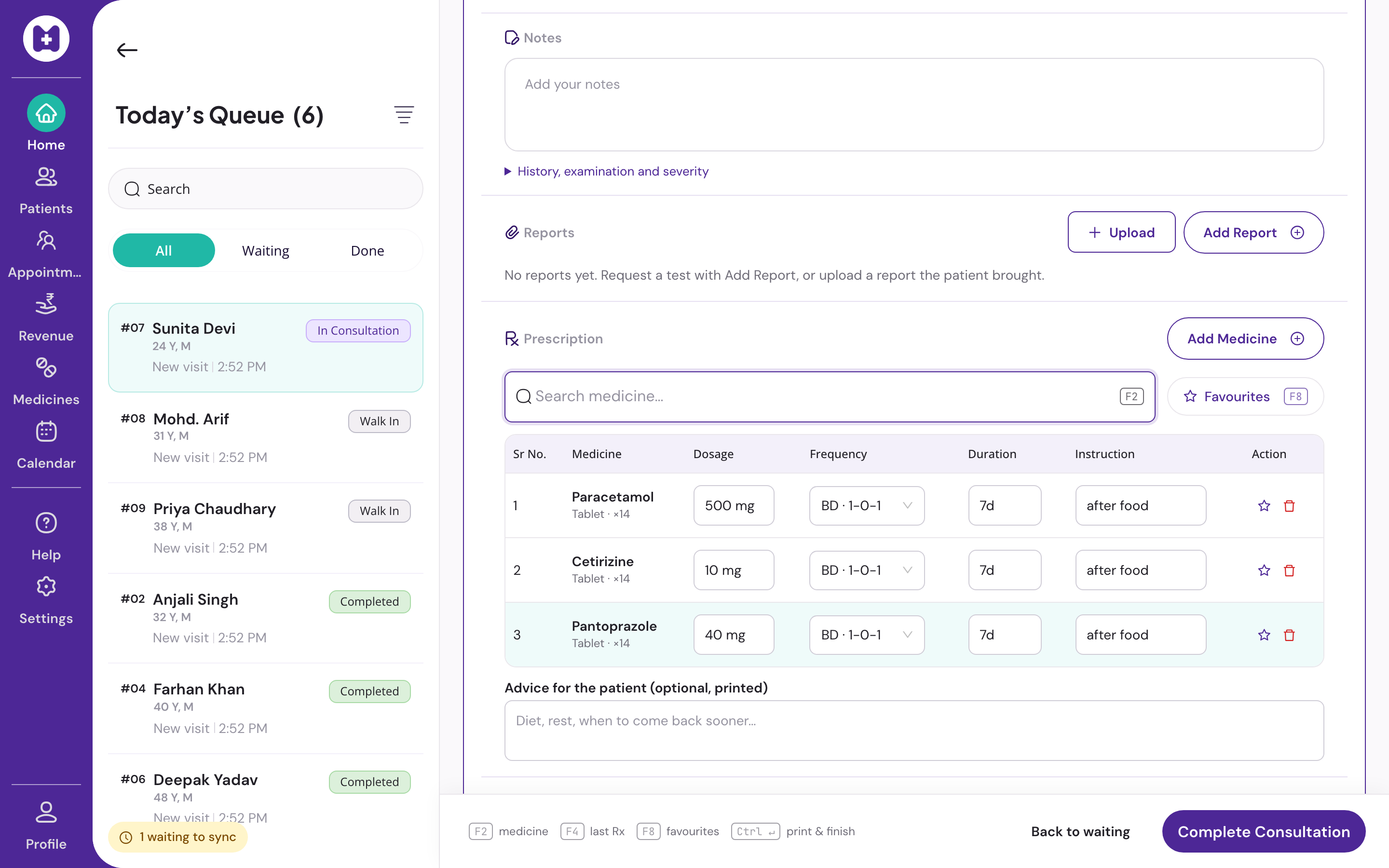
History, pad and queue on one 1366×768 screen
No scrolling for a three-drug prescription. The queue stays in view so you always know who is next.
Keyboard-first
F2 add drug, F4 repeat last, F8 favourites, Ctrl+Enter save and print. Digits pick frequency chips. Your hands stay on the keyboard.
Repeat visit in three steps
Start, F4, Ctrl+Enter. The last prescription is copied, editable, and printed.
Your favourites and templates
Drugs you prescribe often, and multi-drug templates for common conditions. Per doctor, not per clinic.
History beside the pad
Allergies, chronic conditions, last visit, last prescription, earlier visits. Repeat from any of them.
Your letterhead, your name
Logo, qualifications and registration number. A4 or A5, eight drug lines on one page. Nothing from Medyzen on the print.
Offline, then it syncs
Every keystroke is saved to the device at once. Reload after a crash and nothing is lost. Sync happens when the connection returns.
No clinical suggestions
No interaction warnings, no dosage checks, no diagnosis prompts. Vitels records your decision. It never steers it.
Desktop or tablet
Three columns on a 1366×768 desktop. Rails collapse into tabs on a tablet.
Questions doctors ask
Before you switch
01Can I use my own drug names and brands?
Yes. Search the shared list or add a clinic medicine with your own short name. Clinic medicines stay inside your clinic.
02What if I prescribe the same thing to most patients in a season?
Save it as a template once. Next time, pick the template and adjust. Templates are yours, not shared with other doctors in the clinic.
03Does the patient's old prescription get overwritten when I edit?
No. Every version is kept. A same-day correction becomes a revision; you can open earlier versions from the patient's history.
04Can reception see my consultation notes?
Reception sees the queue, patient details and billing. Clinical notes are written and read on the consultation screen.
Try it on your next OPD day
Sign in with your mobile, set up the clinic, add your favourites. Patient registration switches on after our team verifies your medical council registration, usually within one working day.
No card · No licence fee · Export any time