Skip to content
Vitels is live at app.vitels.in. Set up in about ten minutes, verified in one working day.
Medyzen Vitels

Features

What Vitels does, module by module

This list is kept in step with the product. If a feature is listed here, it is live. Roadmap items are marked as such on the FAQ page.

01 / 11

Patient registration

Search first, create second. Families on one number.

  • Search by phone number or name before creating a record
  • Several patients on one phone number; add a family member in seconds
  • Guardian captured for patients under 18
  • Registration notice in Hindi and English, read to the patient, recorded with version and staff member
  • Custom registration fields set by the clinic
  • Patient details can be corrected at the front desk; corrections are recorded
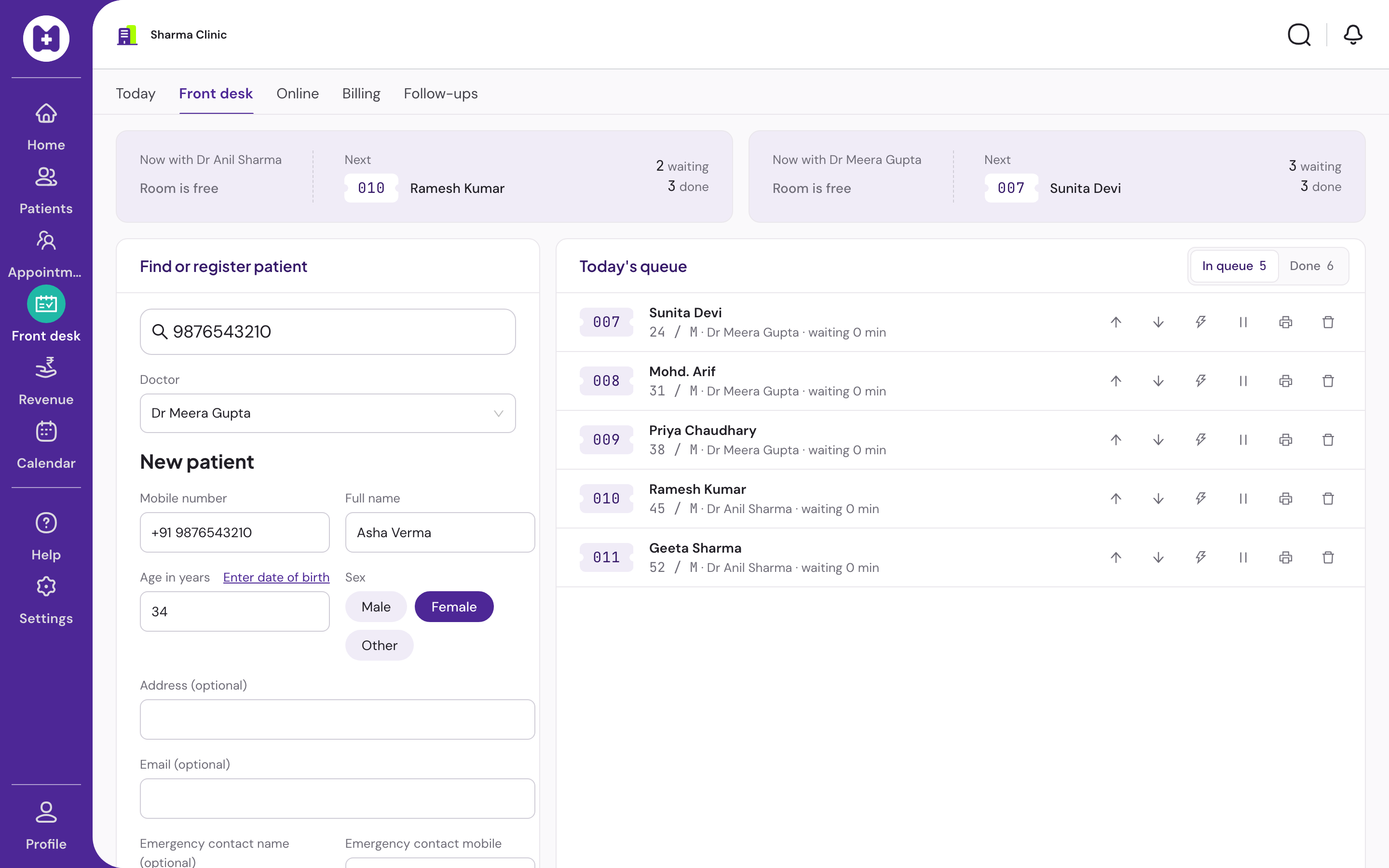
Registration form with phone, name, age, sex and the patient notice step

02 / 11

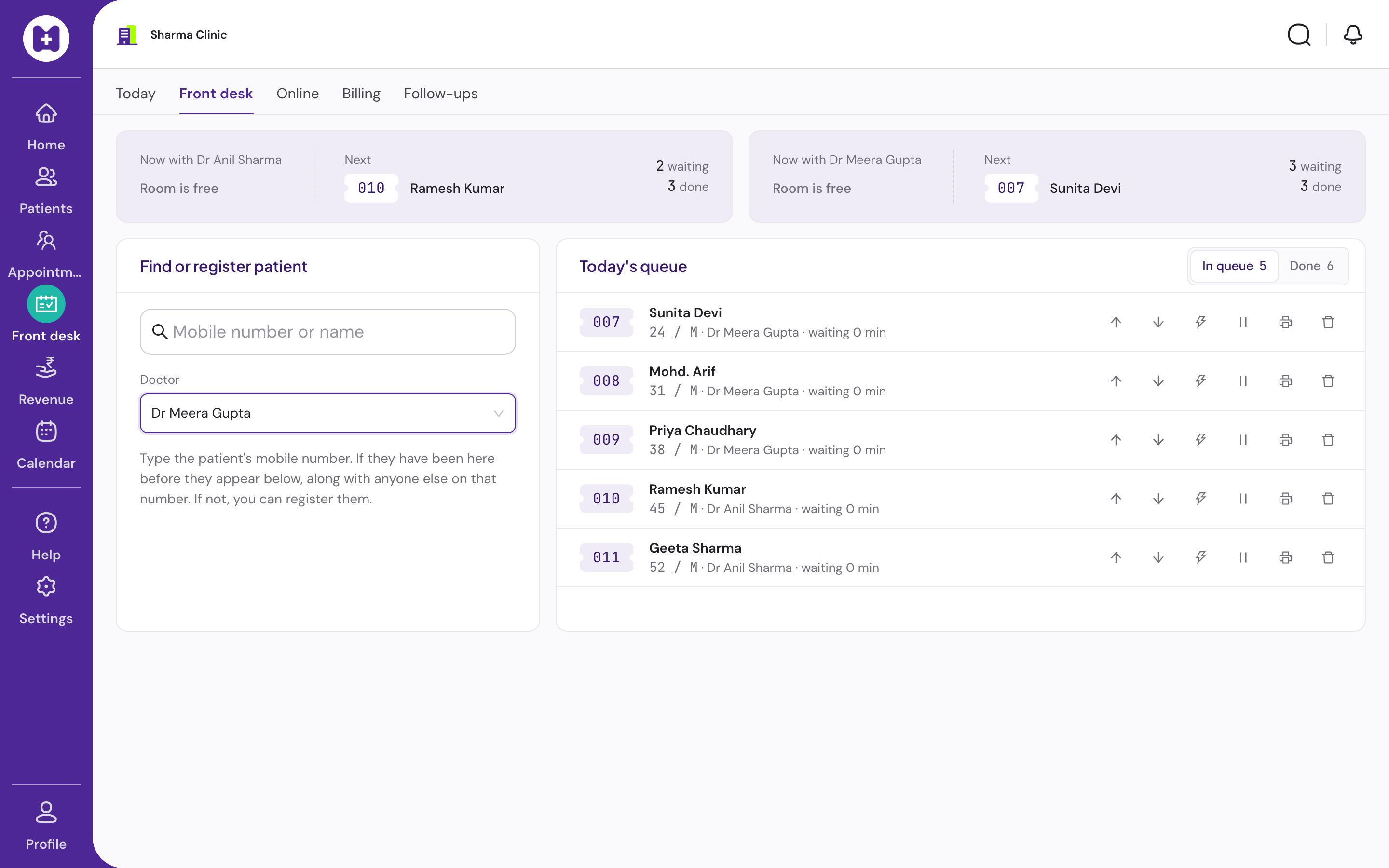
Queue

Daily tokens that reception and the doctor share in real time.

  • Daily tokens, safe under two receptionists at once
  • Waiting, called, in consultation, done, skipped, stepped out
  • Reorder by drag or buttons, priority flag, remove with confirmation
  • Doctor assignment; reception and doctor screens stay in step within seconds
  • Optional 80 mm token slip with patients ahead and approximate wait; prints offline
Reception queue with tokens and statuses

03 / 11

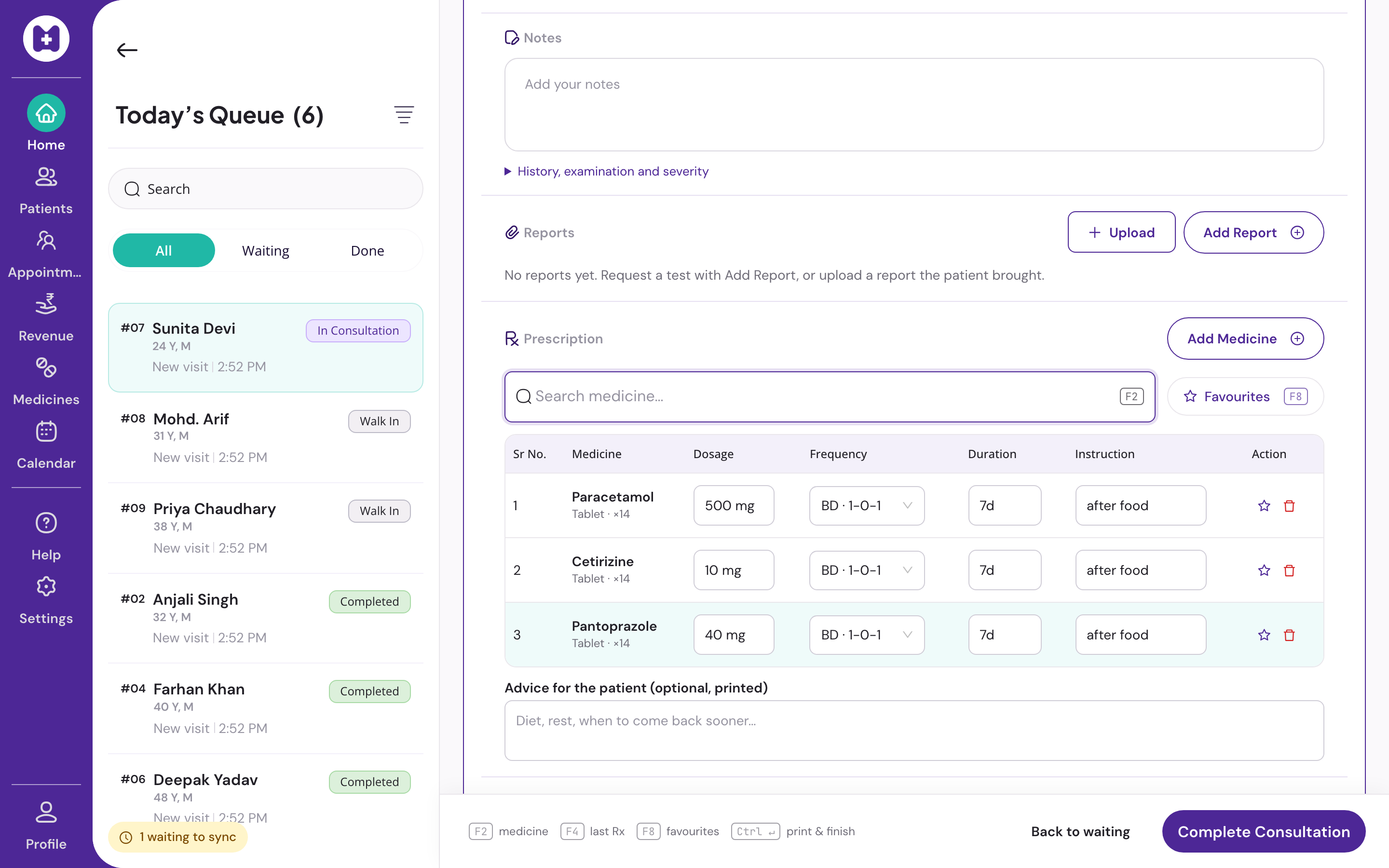
Consultation and prescription pad

Three zones, no scrolling, hands on the keyboard.

F2F4F8CtrlEnter
  • Three-zone screen: patient history, pad, queue. No scrolling for a three-drug prescription at 1366×768
  • Complaint and diagnosis suggestions from the doctor's own past visits only
  • Vitals optional; follow-up by chips or a date
  • Drug search, strength, form, frequency, duration, instructions; quantity computed for counted forms
  • Keyboard shortcuts: F2 add drug, F4 repeat last, F8 favourites, Ctrl+Enter save and print
  • Per-doctor favourites and multi-drug templates
  • Autosave on every change; restored after a crash or reload
  • Every version kept; same-day corrections stored as revisions
  • Clinic medicines with the clinic's own short name; archived medicines leave the pad
Consultation screen with history, pad and queue

04 / 11

Printing

Your letterhead. Nothing from Medyzen on the page.

  • Prescription on the clinic letterhead with logo, qualifications and registration number
  • A4 or A5; eight drug lines on one page
  • No Medyzen branding, advertising or pharmacy reference on any print
  • Receipt (A5), day book (A4), token slip (80 mm), printable patient history
  • All printing works offline

05 / 11

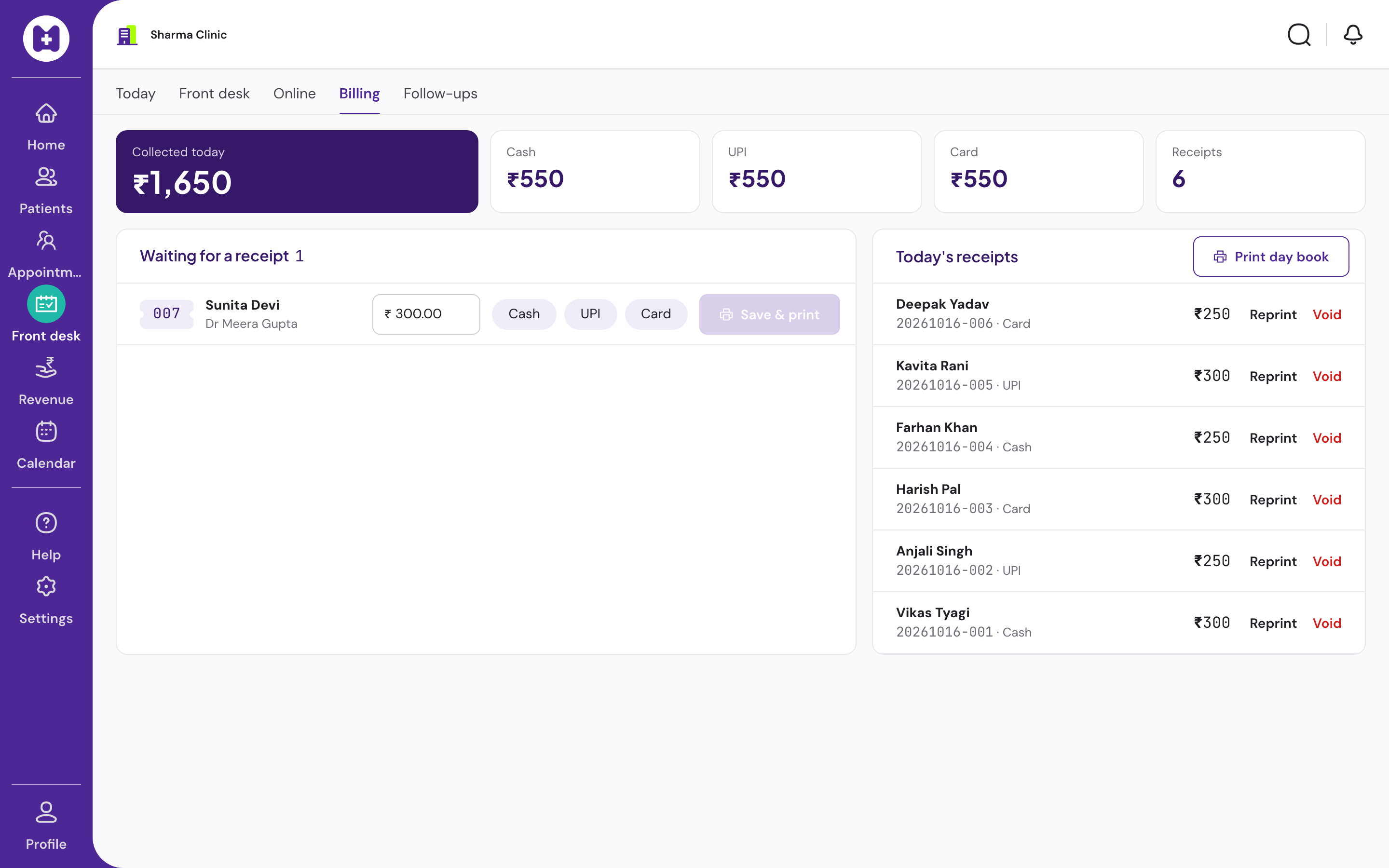
Billing

Saved amounts cannot be edited. Mistakes are voided with a reason.

  • Fee defaults per doctor or clinic; cash, UPI or card
  • Saved amounts cannot be edited, even by direct database access
  • A mistake is voided the same day with a reason, and a new receipt is issued
  • Day book with totals by payment mode
  • Works offline; syncs later
Billing screen with fee and payment mode

06 / 11

Patient history

Every visit, every version, repeatable from any of them.

  • Every visit, expandable, printable
  • Opened from reception search and from the consultation rail
  • Repeat any past prescription
  • Earlier versions of a visit visible to the doctor who wrote it
  • Last three visits available offline

07 / 11

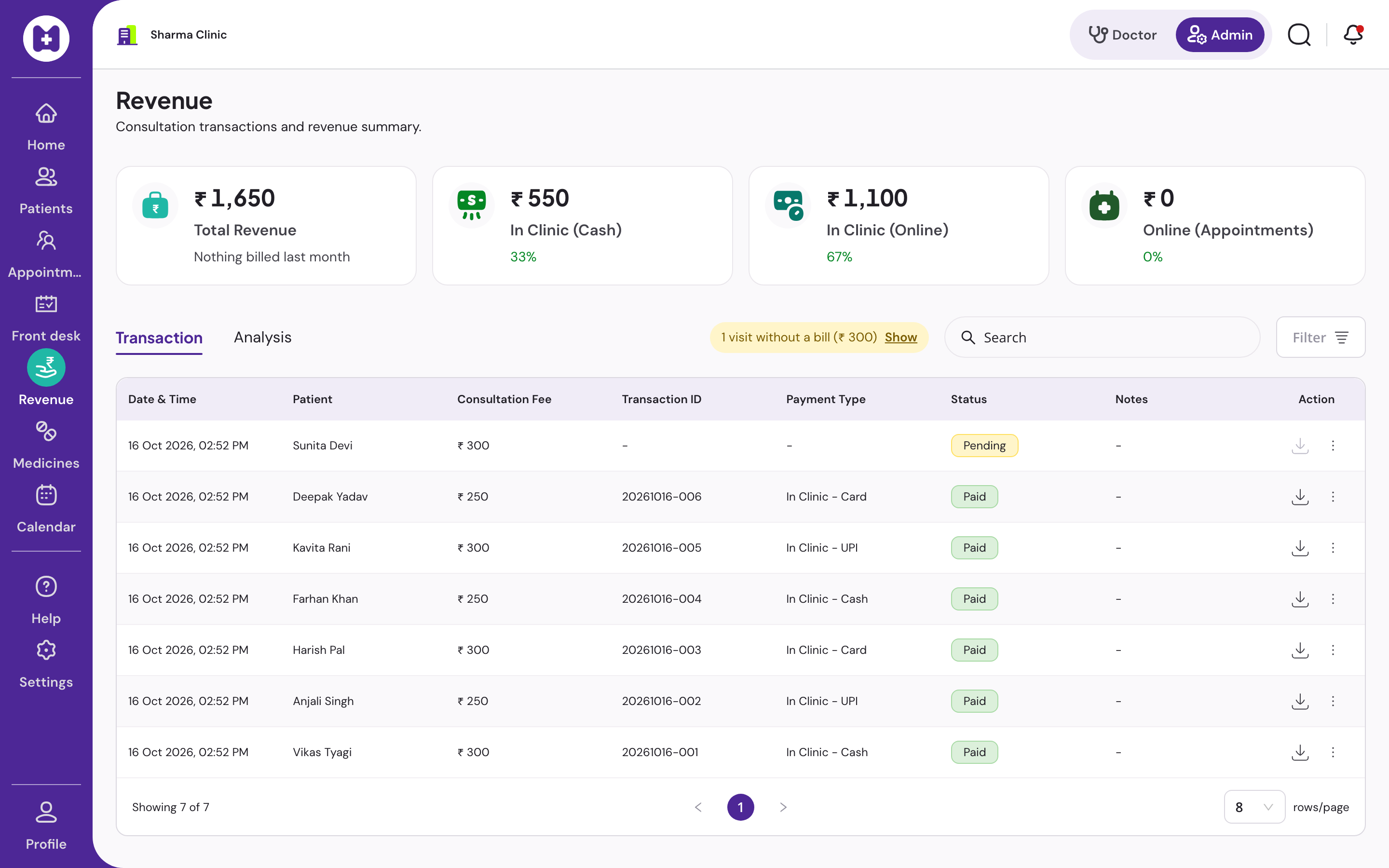
Reports and revenue

By day, by doctor, by payment mode.

  • Patients and collections by day and payment mode
  • Per-doctor counts and revenue split for admins
  • Follow-up due list
  • Patients-per-day chart with a table beside it
  • Transactions with search, filters, pagination and receipt download; voids shown as voided
Revenue analysis with summary cards

08 / 11

Calendar and appointments

Sessions, leaves and front-desk booking.

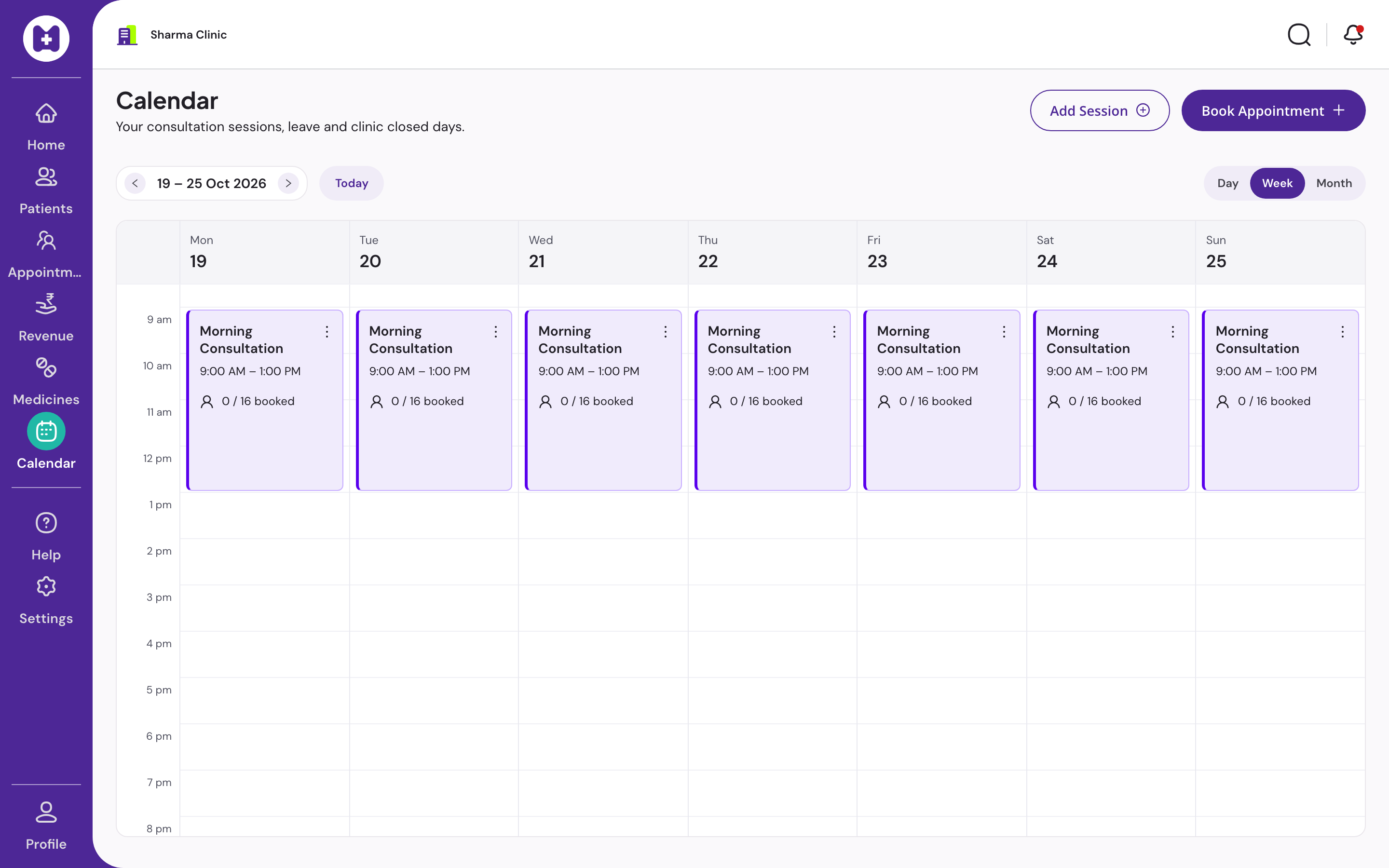
  • Day, week and month views
  • Sessions with overlap checks, leave and closed days
  • Front-desk booking, check-in, reschedule, cancel
  • Online payment for appointments is not offered
Week calendar with sessions and bookings

09 / 11

Admin and settings

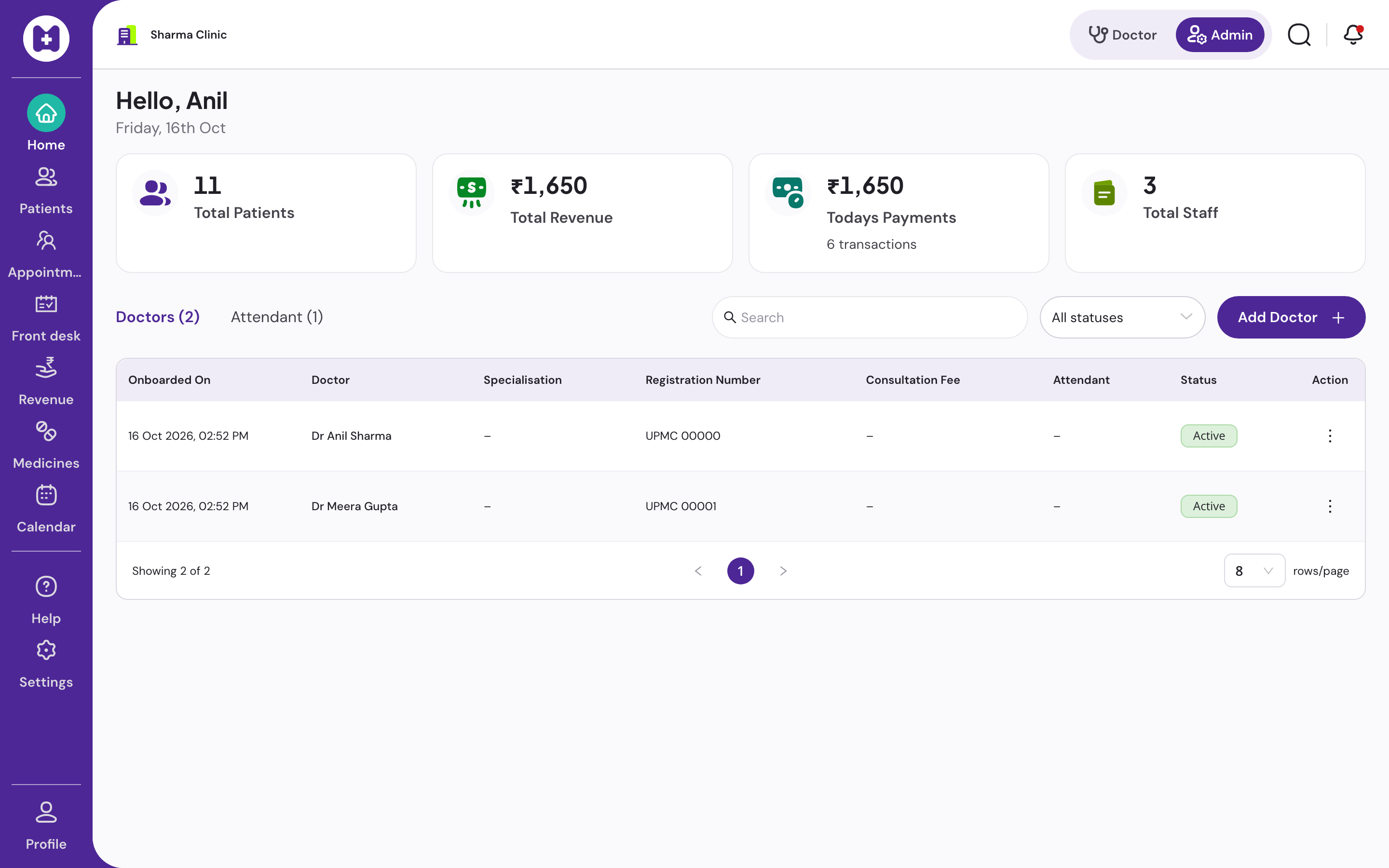
Doctors, attendants, invitations, export and the access log.

  • Clinic profile with grievance contact, paper size, default fee, letterhead logo
  • Doctors with fees, duration, follow-up days and weekly availability
  • Attendants assigned to one, several or all doctors
  • Invitations by single-use link bound to the invitee's mobile; resend, withdraw
  • Remove and restore access; a clinic always keeps one active admin
  • Prescription print layouts, notification preferences
  • Full data export as CSV in a zip, no approval
  • Access log of any support access to your records
  • In-app notifications from real events
Admin staff page

10 / 11

Offline

The day pack lives on the device. The outbox drains later.

  • App shell, fonts and session survive a reload with no network
  • Day pack on login and every two minutes: today's queue, each patient's context and last three visits, letterhead, favourites, drug list
  • Queue, consultation, prescription print, billing and cached patient search work offline
  • Ordered outbox drains when the connection returns; replays are safe
  • Header shows what is waiting and what failed, with retry
  • New registration and search beyond cached patients need the internet, and say so plainly

11 / 11

Sign-in and sessions

Mobile number and OTP. Every action attributed.

  • Mobile number and OTP; no passwords to forget or share
  • Twelve-hour session; several people signed in at once on their own machines
  • Every action attributed to the person who did it
  • Sign out of all devices in one click

Set up your clinic in about ten minutes.

Sign in with your mobile number, enter the clinic details, and our team verifies your medical council registration before patient registration switches on. Usually one working day.

No card · No licence fee · Export any time